Lighthouse · Observatory
Pelican ObservatoryOne pelican. Every model.
Give the same prompt to different models, reasoning efforts and API protocols, and see which one draws a pelican riding a bicycle that looks right and feels alive. Every successful result is shown publicly.
01 · How it works
One prompt, many pelicans
The prompt is fixed; only the scene and verification code change each run. Switch the model, reasoning effort or API protocol to see the difference.
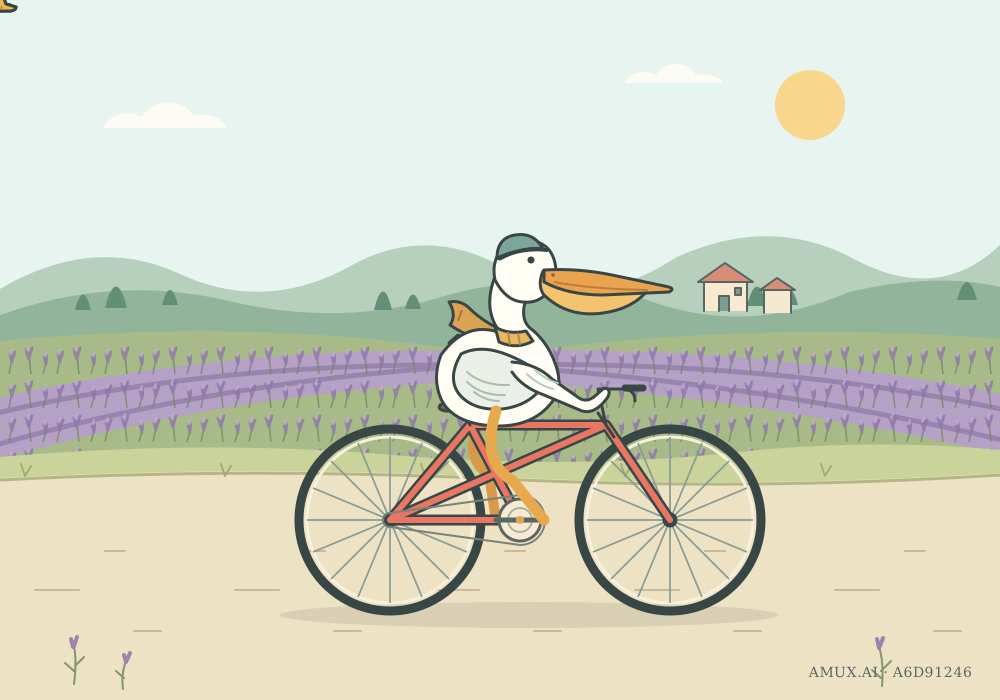
Create an illustration-quality, seamlessly looping 2D SVG animation of a pelican riding a bicycle, like a page from a beautifully designed travel journal. Scene for this run: a random scene. Design the season, weather, road and distant scenery around the scene; do not just swap the background colors. Composition: use a landscape viewBox. The pelican and the whole bicycle take up about half of the frame, with the beak tip, both wheels and the ground shadow fully visible. Keep distinct background, middle ground and foreground layers, and leave breathing room around the subject. Do not put the main picture inside a card, and do not add large titles. Character: a white pelican with a long, wide orange-yellow beak, a visible throat pouch, a curved neck, layered wing feathers and webbed feet. A helmet, scarf or luggage can add personality. It looks relaxed, sits on the saddle, and its wings either keep balance or hold the handlebars. Bicycle: a clear diamond frame, fork, handlebars, saddle, tires, spokes, hubs, chainring and cranks, all connected plausibly. Make the frame coral red or another color that contrasts with the environment. Motion: each foot stays on its own pedal, and the two pedals turn around the same crank axle half a turn apart; the knees bend naturally and the wheels rotate in the direction of travel. The body bobs slightly and the scarf or feathers move in the wind. Near details such as road texture and grass move backwards while distant scenery moves more slowly, so it reads as riding rather than shaking in place. Every loop joins seamlessly. Art: clean outlines, consistent stroke width and a clear hierarchy of detail; bright, airy environment colors with warm accents, avoiding a single color family across the whole picture. Pick two or three details that fit the scene, such as waves and sailboats, falling leaves and road signs, or snow and pine forests, without covering the character. The pelican and bicycle must stay readable when scaled down to phone width. In the bottom-right corner, show this run's verification code in a visible SVG text element, reading exactly: AMUX.AI · XXXXXXXX. Return only one complete SVG. Inline CSS or SMIL animation is allowed; do not use HTML, JavaScript, external images, external fonts or any other external resources.
Explore all 24 scenes
Each run picks one of these 24 scenes at random:
- Highway at dusk
- Wetland after rain
- Lakeside windmills
- Volcano and lava
- Spring hillside
- Outer space
- Post-apocalyptic city
- Mountain pass summit
- Snowy valley
- Autumn forest road
- Seaside boardwalk
- Desert dunes
- Bamboo grove
- Cherry blossom riverbank
- Night market
- Misty rice terraces
- Northern lights
- Lavender fields
- Red rock canyon
- Clifftop lighthouse
- Tropical island
- Old town bridges
- Undersea tunnel
- Road above the clouds
To keep results comparable, models always receive the English original.
How it works
- 1
Pick a model and protocol
Use your workspace, an Amux API key or any external endpoint, then choose a model, API protocol and reasoning effort.
- 2
Wait in line
Only a limited number of runs generate at once across the site; the rest queue in order. You can cancel at any time.
- 3
Shown publicly
Successful results join the public gallery with model, protocol and timing details, and can be shared with anyone.
02 · Try it
Run a test
Choose a model and settings. Follow the result in the live preview. This observatory is mainly used to track whether GPT models stay consistent over time or quietly get worse. It does not reflect any model’s overall capability. Models excel at different tasks, so treat the results as a reference only.
03 · Gallery
Public gallery
Every successful run appears here. Open one to see it full size with all details.
 gpt-6-astra
Lavender fields · azure · Responses · Medium
- Time
- 3m13s
- First token
- 1m10s
- Output
- 9,074
 gpt-6.1-terra
Lavender fields · amux-special · Chat · High
- Time
- 1m38s
- First token
- 9.4s
- Output
- 5,262
 gpt-6.1-terra
Mountain pass summit · azure · Chat · High
- Time
- 1m12s
- First token
- 34.8s
- Output
- 8,759
 gpt-6.1-sol
Cherry blossom riverbank · amux-special · Chat · Medium
- Time
- 4m29s
- First token
- 1m44s
- Output
- 15,587
 gpt-6.1-sol
Red rock canyon · azure · Chat · Medium
- Time
- 2m38s
- First token
- 30.8s
- Output
- 8,141
 gpt-6-astra
Old town bridges · amux-special · Responses · Medium
- Time
- 2m51s
- First token
- 22.1s
- Output
- 11,868